
Two man routing
This process will guide you how to manifest and release a 2 man jobs, to two technicians.
Firstly the 2 man job needs to be booked in as normal using the standard booking screen in MedequipWay. If an item is flagged as needing 2 technicians, the below icon will appear next to the order.
Please note if you do not see the two man icon when booking the job, then the item is not flagged a needing two technicians. See the red comments box below on how this can be added onto the system.

Once the route is booked and is ready to be released, you will notice the "release multiple routes" screen is now split. This is because the system has recognised that there is an outstanding 2 man jobs booked in for the selected date.
2 Man flags
The system recognises a two man job by the product code. Currently the system will only flag a two man order for standard stock items. If when booking the order in MedequipWay the two man icon appears next to the job, the system will allow this order to be released to two technicians.
If you have a standard stock item which is not appearing as a Two man job, please LiveChat the product code for this to be enabled on the system.
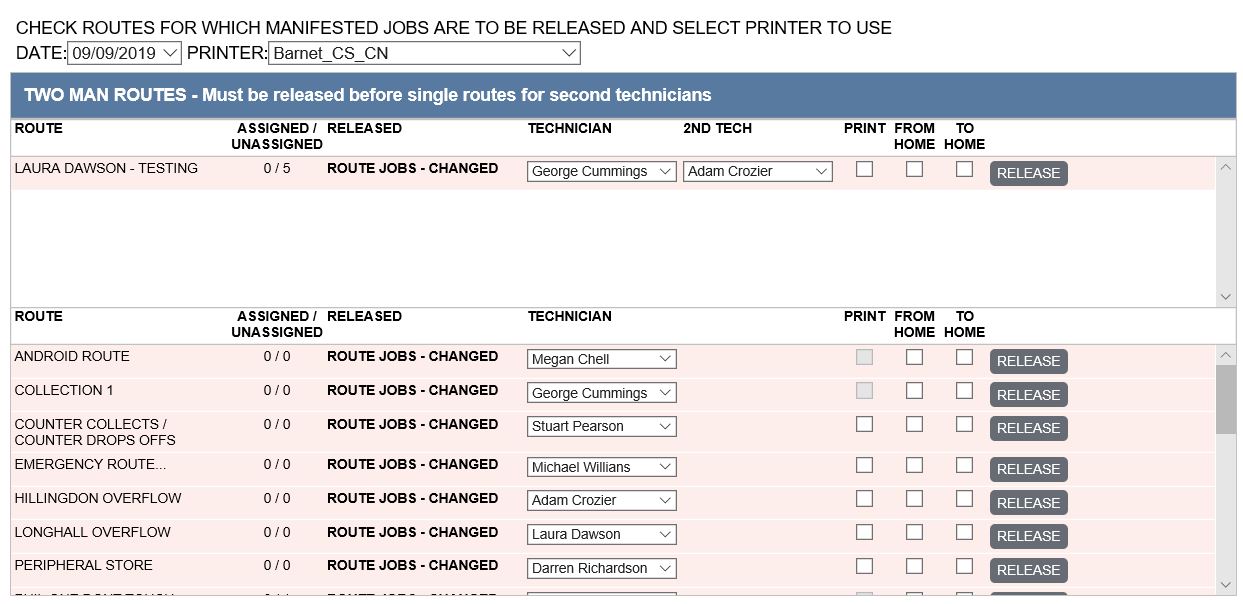
In the "Two Man Routes" section you need to select the main technician and the 2nd technician. The main technician will be able to complete the order on the scanner, where as the 2nd tech will only be able to see the job within the Manifest sheet.
Please note - The 2 man route will need to be released before the 2nd technicians route is released.
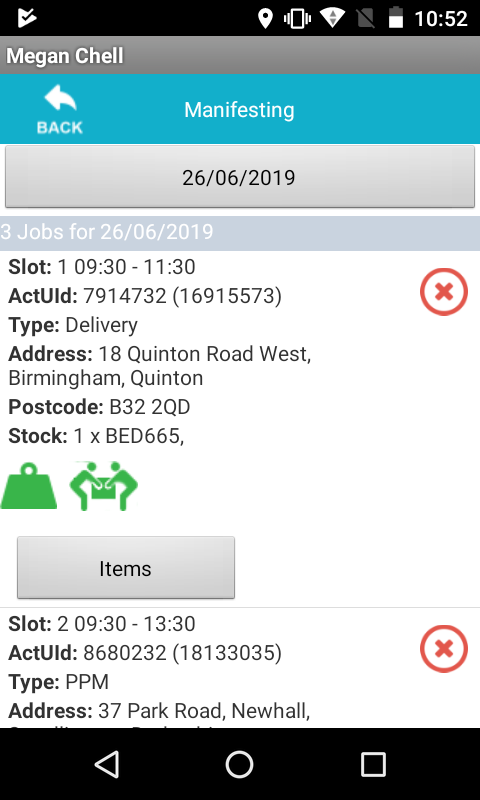
Once you have selected both techs and realised the route, the main technicians jobs will appear on the scanner as normal. But if the tech looks at his Manifest sheet on the scanner he will see the 2 man icon indicating that another technician will be meeting him at the property.
On the 2nd techs scanner, again looking at the manifest sheet. This job will appear so he can be reminded. The timeslots on both scanners will be the same also. Please note for the 2nd technician this job will not appear in the "My Jobs" screen only the manifest sheet.
If the 2nd technician is also attending there own route. This can now be released and this will leave the 2 man job within the manifest sheet for future reference of the jobs details.
This system can be turned on per route, if you do not see this option to release to both technicians. Please contact Livechat and this can be turned on.
If anyone has any questions into how this works, please contact LiveChat or Laura Dawson, Business Improvement - [email protected]
Updated over 6 years ago